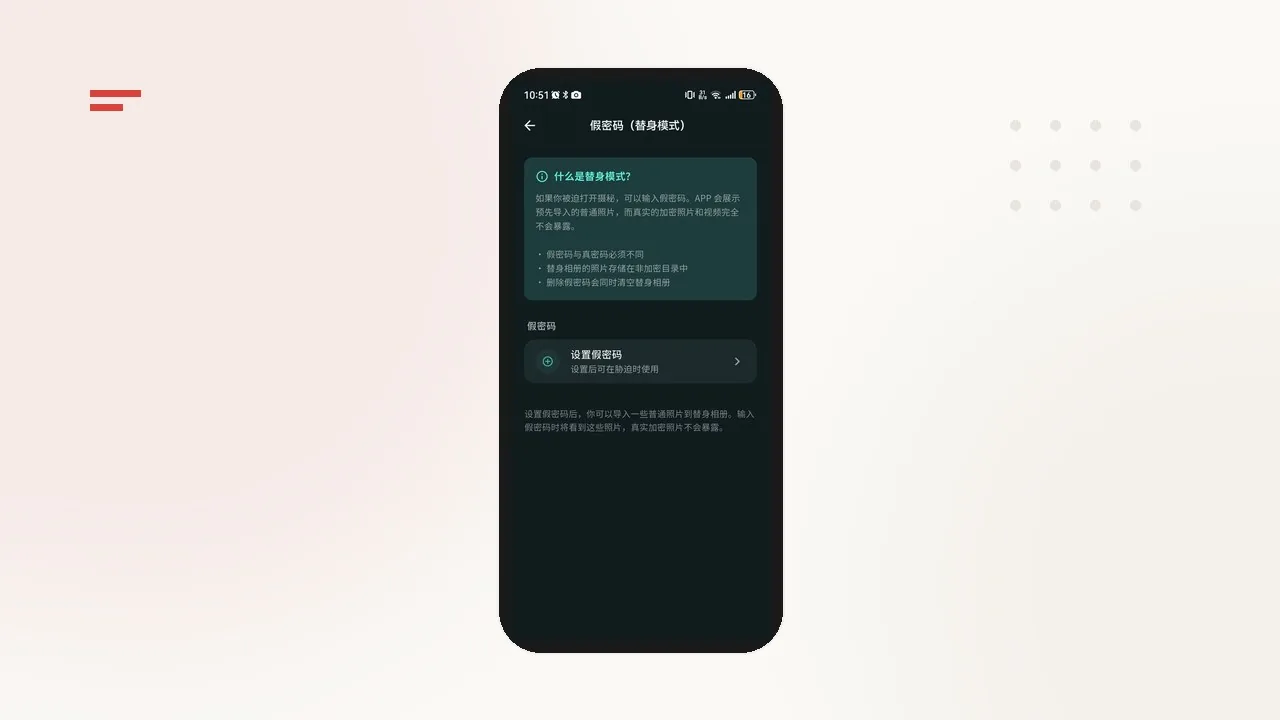
Encrypted vaults hide your photos. A decoy passcode handles a different, nastier scenario: someone standing next to you, asking you to unlock your phone. Encryption says "you can't see these." A decoy says "here, look at my album" — and shows them something ordinary. This guide explains how the two work, where each one fails, and why the smartest setup uses both.
First, the two architectures
Most photo-protection apps follow one of two designs:
- Hide after transfer (vaults): a photo lands in the camera roll first, then gets copied into an encrypted space, then you delete the original. Three steps, and every step is a chance to forget one.
- Shoot into the sandbox (privacy cameras): the photo goes straight into the app's private sandbox at capture. No camera roll copy ever exists, so there is nothing to hide and nothing to forget.
That difference matters before anything else: where the original lives decides how much you have to trust your own habits.
The decoy passcode principle: two passcodes, two spaces
A decoy album works like this:
- One app, two passcodes, two separate spaces. The real passcode opens your actual private gallery. The decoy passcode opens a decoy album — a normal-looking album you prepared in advance.
- The person checking (or watching you type) sees a boring, believable album: scenery, food, everyday screenshots. Nothing suspicious, nothing hidden.
The trick is that a decoy doesn't defend by hiding — it defends by performing. The real space is never accessed, and the checker's need ("let me see your photos") is satisfied. Both sides get what they want, and nobody loses face. In SheMi the word "decoy" never appears anywhere on screen — the fake album just looks like your normal gallery.
Four mistakes that break a decoy
1. An empty decoy album
An empty album is more suspicious than no decoy at all. "Why would you keep an empty album behind a passcode?" is exactly the question that gets the real passcode demanded next. A working decoy looks like an album in active use: dozens of dull photos, a plausible date range, occasional new additions.
2. A decoy passcode that's too simple — or too meaningful
Both extremes backfire. Too simple (123456): easy to fumble under pressure, or for someone to guess on a second try. Too meaningful (an anniversary): anyone who knows you gets it in one attempt. The right decoy passcode is natural and private: easy for you to remember, and unlikely to be anyone else's first guess. Type it daily until it's muscle memory — hesitation at the key moment is what gives you away.
3. Real and decoy passcodes that are too close
123456 and 123457, one digit apart: press the wrong key under stress and you open the real space instead — worse than having no decoy. The real and decoy passcodes must differ enough that you can't mistype them blindfolded.
4. Treating the decoy as your main defense
A decoy solves one scenario: being asked to open the phone. For the wider question of which lock stops whom — Face ID, the Hidden album, third-party apps — see our guide to locking photos on iPhone. It does not protect against someone glancing at your screen, a lost phone, or someone who knows your real passcode. The correct role is the last line of defense — in front of it sit source isolation (photos never enter the camera roll), auto-lock, and screen-recording cover. Layered together, a decoy has something to protect.
Decoy vs encrypted vault: which actually protects?
| Threat | Encrypted vault | Decoy passcode | Sandbox camera (SheMi) |
|---|---|---|---|
| Casual snooping | Yes, if locked | Not its job | Yes — photos are never in the open |
| Being asked to unlock | No — a locked vault invites "what are you hiding?" | Yes — this is its job | Yes — plus the decoy for the moment of unlocking |
| Cloud copy leakage | Depends on the app's backup flags | N/A | Yes — sandbox excluded from iCloud backup |
| Forgotten passcode | Photos locked away (some apps offer recovery keys) | Decoy only — real space unaffected | Recovery key provided |
Seen from the checker's side, the difference is practical: a locked vault provokes the question "what are you hiding?", while a decoy ends the interaction before it starts. The honest answer: neither alone is enough. A vault without a decoy collapses the moment someone asks you to unlock. A decoy without source isolation still leaks photos through the camera roll and cloud sync. The combination — sandbox capture + decoy passcode — is what actually holds under real pressure.
Summary
A decoy done right is "performance on point"; done wrong, it's a neon sign saying "something is hidden here." The principle is simple — two passcodes, two spaces — and the mistakes are avoidable: keep the decoy realistic, keep the passcodes apart, and position the decoy as the last layer, not the first. Get those four right and the final line of defense actually holds.
Frequently asked questions
What should a decoy album contain?
Dozens of ordinary photos with a plausible date range — scenery, food, screenshots — plus a few recent additions. An empty or brand-new decoy album is more suspicious than none.
Does the decoy protect against someone who knows both passcodes?
No system protects against a passcode you have shared. A decoy protects against pressure and casual checking; keep both passcodes to yourself, and change them if either leaks.
Does a decoy passcode encrypt anything?
No. A decoy is a separate album behind a second passcode; it handles the moment someone asks you to unlock the phone. Encryption and sandbox isolation are a different layer.
Can someone tell they are looking at a decoy?
Only if it looks suspicious — empty, brand new, or oddly named. A realistic decoy looks like an album in normal daily use.
Do I still need encryption if I use a decoy?
Yes. A decoy answers "open it for me"; source isolation decides what exists to open in the first place. SheMi keeps photos in its own local sandbox — the protection comes from where the file lives, not from a decoy alone.